
Last updated on
Nov 5, 2026
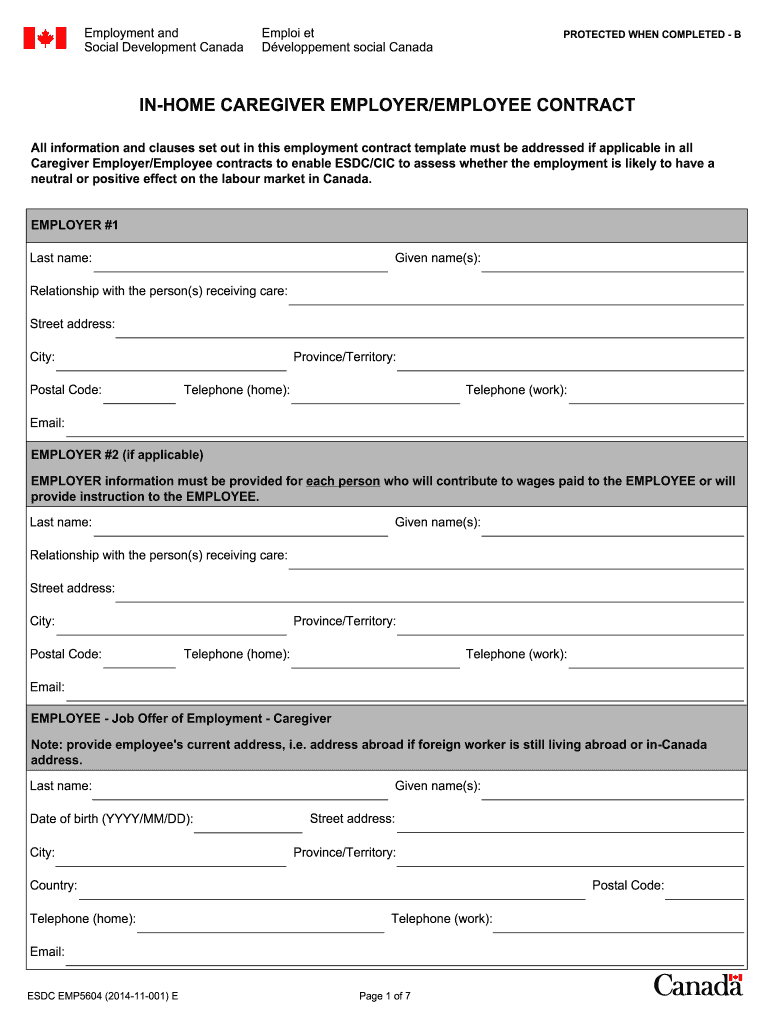
CA ESDC EMP5604 2014 free printable template
pdfFiller is not affiliated with any government organization

Fill out
Complete the form online in a simple drag-and-drop editor.

eSign
Add your legally binding signature or send the form for signing.

Share
Share the form via a link, letting anyone fill it out from any device.

Export
Download, print, email, or move the form to your cloud storage.
Why pdfFiller is the best tool for your documents and forms


End-to-end document management
From editing and signing to collaboration and tracking, pdfFiller has everything you need to get your documents done quickly and efficiently.
Accessible from anywhere
pdfFiller is fully cloud-based. This means you can edit, sign, and share documents from anywhere using your computer, smartphone, or tablet.
Secure and compliant
pdfFiller lets you securely manage documents following global laws like ESIGN, CCPA, and GDPR. It's also HIPAA and SOC 2 compliant.
What is CA ESDC EMP5604
The In-Home Caregiver Employer/Employee Contract is an employment contract template used by Canadian employers to formalize agreements with in-home caregiver employees.
pdfFiller scores top ratings on review platforms




I just started using this software … Found it while searching for a PDF Editor on Google...Very easy to use... Extremely efficient … I love it!
great - easy to use. a few minor glitchy things i would change if i could!
Who needs CA ESDC EMP5604?
Explore how professionals across industries use pdfFiller.

CA ESDC EMP5604 is needed by:
-
Canadian employers hiring in-home caregivers
-
Individuals seeking to establish caregiver employment agreements
-
Legal professionals drafting caregiver contracts
-
Organizations providing caregiving services
-
Agencies supporting caregiver employment
Comprehensive Guide to CA ESDC EMP5604
What is the In-Home Caregiver Employer/Employee Contract?
The In-Home Caregiver Employer/Employee Contract is a formal agreement that outlines the employment terms between an employer and an in-home caregiver in Canada. This contract serves to protect the rights of both parties by clearly defining job responsibilities, wages, and other essential details.
Formalizing the relationship through an in-home caregiver contract is crucial. It helps prevent misunderstandings, provides legal protection, and ensures both parties have clear expectations regarding the employment arrangement.
Purpose and Benefits of the In-Home Caregiver Employer/Employee Contract
Having a caregiver employment contract is necessary for maintaining a professional relationship between the employer and the employee. A written agreement lays out clear terms and conditions, which benefits both parties in several ways.
-
Establishes clarity of expectations regarding duties and responsibilities.
-
Offers legal protection in case of disputes or misunderstandings.
-
Prevents potential conflicts over wages and benefits.
Key Features of the In-Home Caregiver Employer/Employee Contract
The main components of the in-home caregiver contract include critical details that outline the terms of employment. This ensures that both the employer and the employee are on the same page regarding various aspects of the job.
-
Terms of employment including hours of work.
-
Wages based on hours worked or salary agreements.
-
Specific job responsibilities outlined clearly.
-
Accommodation and transportation costs if applicable.
Who Needs the In-Home Caregiver Employer/Employee Contract?
This contract is essential for employers hiring caregivers and employees working in the in-home care sector. Various scenarios may necessitate the creation of this contract.
-
Employers seeking reliable caregivers for personal assistance.
-
Employees looking for clarity in their job roles and compensation.
-
Situations requiring formal job offers and obligations.
How to Fill Out the In-Home Caregiver Employer/Employee Contract Online
Completing the in-home caregiver contract online can be straightforward if you follow a detailed guide. Here are the essential steps to fill out the form digitally:
-
Access the fillable form template and start entering personal details.
-
Clearly define the job description in the designated field.
-
Specify payment terms including wage rates and payment frequency.
Common Errors and How to Avoid Them When Completing the In-Home Caregiver Employer/Employee Contract
Many individuals make common mistakes when filling out the caregiver contract, which can lead to complications. Here are typical errors to watch out for and tips to ensure accuracy:
-
Missing required fields such as names or contact details.
-
Inconsistencies in job descriptions and responsibilities.
-
Omitting signatures from both parties.
How to Sign the In-Home Caregiver Employer/Employee Contract
Signing the in-home caregiver contract can be done through various methods, both digital and traditional. Knowing the signing requirements is essential to ensure the contract is legally binding.
-
Options for digital signatures that maintain security.
-
Understanding the legality of electronic signatures in Canada.
-
Ensuring both parties are present for wet signatures when required.
Where to Submit the In-Home Caregiver Employer/Employee Contract
Once completed, the contract must be submitted correctly along with any necessary accompanying documents. Familiarizing yourself with submission methods is crucial.
-
Submitting through recommended online platforms if applicable.
-
Providing copies to both parties after submission for record-keeping.
Security and Compliance for the In-Home Caregiver Employer/Employee Contract
Handling sensitive information securely is a priority when dealing with caregiver contracts. Privacy and data protection laws must be followed to protect personal information.
-
Adhering to HIPAA and GDPR compliance for data security.
-
Utilizing secure platforms that offer 256-bit encryption to safeguard documents.
Streamline Your In-Home Caregiver Contract Process with pdfFiller
pdfFiller provides an effective solution for users looking to manage their in-home caregiver contract process efficiently. By utilizing pdfFiller’s features, users can simplify their tasks.
-
Edit and fill out forms seamlessly.
-
Sign digitally with secure methods.
-
Leverage user-friendly tools for document management.
How to fill out the CA ESDC EMP5604
-
1.Access the In-Home Caregiver Employer/Employee Contract on pdfFiller by searching for the form title in the search bar.
-
2.Open the form to view the fillable fields and instructions provided on the document.
-
3.Before filling, gather necessary details such as both parties' names, dates of birth, work location, job descriptions, and wage agreements.
-
4.Start filling in the sections, entering information into the provided fields such as 'Last name' and 'Date of birth', using the appropriate fields for checkboxes as necessary.
-
5.Use pdfFiller’s interface to navigate between fields easily. Click on each field to enter text or select options.
-
6.Once all information is entered, review the form for any inaccuracies. Ensure all details align with the employer's and employee’s agreements.
-
7.Finalize the document by checking all required sections are completed and printing if a physical signature is needed.
-
8.Save your progress frequently, utilizing the 'Save' option. To download the completed form, click the 'Download' button or submit directly through provided channels on pdfFiller.

Who is eligible to use the In-Home Caregiver Employer/Employee Contract?
This contract is primarily for Canadian employers hiring in-home caregivers. Both parties involved, the employer and employee, must agree to the terms outlined in the document.
What information is required to fill out the form?
You will need both parties' names, dates of birth, job description, work location, wage details, and any specific agreements regarding accommodation and transport costs to complete the form.
How do I submit the completed In-Home Caregiver Contract?
The completed form can be submitted directly through pdfFiller by following the on-screen instructions or downloaded for physical signing, depending on your preference.
Are there common mistakes to avoid when completing this form?
Common mistakes include leaving fields blank, mismatching information between parties, and not reviewing the signed document thoroughly. Ensure all required sections are filled accurately.
Is notarization required for this contract?
No, notarization is not required for the In-Home Caregiver Employer/Employee Contract, making it easier for both parties to execute the agreement without additional steps.
What is the processing time for this employment contract?
Processing time depends on individual circumstances and agreements between the employer and employee. Generally, it can be finalized on pdfFiller once completed and reviewed, without significant delays.
What should I do if I encounter issues while filling out the form?
If you face any issues, refer to pdfFiller's support resources for help. Additionally, ensure that you have all required information ready before starting to fill out the form.
CA ESDC EMP5604 Form Versions
Related Content
Related Forms


Related Catalogs
Get the latest insights from our blog


If you believe that this page should be taken down, please follow our DMCA take down process
here
.
This form may include fields for payment information. Data entered in these fields is not covered by PCI DSS compliance.